Jumat, 30 Maret 2012

Help Desk Hangouts: Reaching the right customers with Google AdWords

Editor’s note: Each week on the Google+ Your Business page, we’re putting you in touch with Googlers and users who can help you as a business owner get the most out of our products and features.

In our latest Help Desk Hangout On Air, we discussed Google AdWords — how to get started, picking keywords, tracking clickthrough rates, and more! Dori Storbeck, Courtney Pannell, Chad Baranik and Gina Bucciere shared some of their tips and tricks for managing a successful AdWords campaign. If you missed it — don’t worry! — you can watch the full hour-long Hangout on the Google Business YouTube channel:


Earlier in the week and during the Hangout, we collected your questions. Here are a few of the things we addressed:

Is there a limit to the amount of AdGroups in one Campaign?

Each campaign can have up to 20,000 Ad Groups.

What is a good CTR? Does my spend affect my CTR?

In general, we consider a good CTR (click-through-rate) to be 1 percent or above on the Search Network. On the Display Network, users are generally at a different point in the buying cycle and, therefore, we expect a much lower CTR. To evaluate the performance of your Display ads, you may want to look at the Relative CTR metric.

What are the top 10 things one can do to improve their Quality Score?

Really, the thing to focus on here is ensuring that you have good account structure and that your keyword lists are tightly themed and highly relevant to your ad text and your landing page. Focusing on CTR, which is a large part of Quality Score, can help too.

I noticed my quality score changes from day to day. Should I only be reviewing my score weekly or monthly before making changes?

Quality Score is a dynamic metric that is actually calculated each time your ad is eligible to enter the ad auction. The score that you can view next to your individual keywords is basically a snapshot estimate of how relevant your ads, keywords, and landing page are to a person seeing your ad. While Quality Score is an important metric, we’d suggest focusing on some of the other metrics we also covered in the Hangout, like CTR, average position, and conversion tracking.

Do you suggest eliminating all keywords/ads that don't produce conversions over a six month period?

It totally depends on your goals. If, for example, your main advertising goal is to drive conversions and you notice some keywords have been in your account for a while but aren’t helping you achieve your goal, you might consider pausing or deleting those keywords - particularly if you’re paying a lot for those clicks.

Will your keywords with different match types "fight" against each other if they both qualify for the impression?

Essentially, yes. In determining which keyword enters the auction, the AdWords system is going to try to match the keyword that most closely matches the user’s query, but it will also factor in which keyword will be cheapest and get the highest ad position.

It’s not necessary to have all the match types for every keyword in your account. When choosing a match type, think about how users might conduct a search for your business or services, then choose which match type (broad, broad match modifier, phrase, exact) would allow for the most number of users to be able to find you for relevant searches. You can read more about the main keyword matching options here, and about the broad match modifier option here.

If I had drawn a custom shape before that feature was removed is it possible that I am still targeting that area (the account still shows I am)?

Location targeting by custom shape is no longer supported. If you didn’t select specific targeting areas other than the custom shape before we sunset the feature, the AdWords system would have used your custom shape to match your campaign to the targeting areas (cities, metro areas, states, countries) that best match the area within your previously selected shape.

How do I target just five states? I see most of our sales coming from just these five. I would like to see if that increases my sales.

Within your AdWords account, you’ll want to navigate to the Campaigns tab at the top and then select the specific campaign. Then, on the gray Settings tab for that campaign, under the “Locations and Languages” subtitle, there is a “Locations” section.  By clicking the blue Edit link next to “Locations” you can then select specific states (or cities) to target.

To learn more about how to get started with AdWords, visit our Help Center or check out the AdWords Community forum. And remember to tune in to the live stream of our next Hangout at 11 a.m. PDT Wednesday April 4, when we discuss how to get started on Google Places. We’ll be collecting your Places questions early next week on the Google+ Your Business page.

Posted by Dori Storbeck and Courtney Pannell, Global Online Advertising Associates

Selasa, 27 Maret 2012

The Business March 28th 2012, "Exceeded Bandwidth" Edition


The Business is downloading some serious funny this week as we stuff our network with more special guests than you can shake a router at. Don't worry, we've got major capacity so things won't slow down or freeze. We'll be delivering rich live content at speeds that would melt your cable or DSL connection. Linking-up with us this week are:

Karl Hess: Curly headed taco truck enthusiast from Los Angeles; knows how to wear a sweater; makes hilarious jokes - http://karlhesscomedy.com/

Josh Androsky: One of the clowns behind Hamclown: Los Angeles comedy hotspot; Occupies Wall Street; makes hilarious jokes. - http://joshandrosky.tumblr.com/

Dan Crane: Known to the planet as Björn Türqoue, air guitar second-place legend and master of world ceremonies; Knows some dudes at Wheat Thins; makes hilarious jokes. - http://www.dancrane.com/Site/Home.html

Stephanie Tolev: Toronto's own; in a sketch group called Ladystache and also attempting to grow one as well; makes hilarious jokes. - http://www.ladystache.com/site/about

Sean Keane has dropped off the grid, but we have Bucky, Chris G., Caitlin, Alex and Chris T. on hand to move data into your ports.

As always our show is a standard flat rate of $5.  Shows at eight, bring a burrito and a date.

Learn with Google: Get advice and information to help grow your business

Business owners want to understand how online search and marketing works, and make sure they’re getting the most out of the efforts they put in. With that in mind, we’re excited to introduce you to Learn with Google. Whether you’re just getting online, interested in marketing, or itching to do more, Learn with Google can help. On the site you’ll find videos, how-to guides, and worksheets, all of which will help you effectively promote your business online.

Here’s an example of the types of resources you can find at Learn with Google. This video shows you how to connect with local customers online.

Did you know that one out of five Google searches is related to location? This video gives you tips to:
  • Make your website more local-friendly
  • Connect with customers on Google+
  • Bring in customers with reviews


When you’re done with the video you can download the worksheet, which will walk you through the process to start reaching more customers in your area.

Posted by Sadie Stoumen, Product Marketing Manager

Jumat, 23 Maret 2012

Help Desk Hangouts: Learn how your business can use Hangouts to engage and collaborate

Editor’s note: Each week on the Google+ Your Business page, we’re putting you in touch with Googlers and users who can help you as a business owner get the most out of our products and features.

In our latest Help Desk Hangout On Air, we discussed Google+ Hangouts — a topic many of you wanted to know more about (how to get started, ideas for what to cover in your Hangouts, and so on). With special guests Teresa Wu of the Google Docs team, and Hangouts power users Seth David and Tom Rolfson, we talked about how you can use Hangouts to engage customers and collaborate with your teammates. If you missed it, you can watch the full hour-long Hangout on the Google Business YouTube channel (really great tips!):


We collected questions via the Google+ Your Business page and tried to answer as many as we could in the Hangout. Here are a few of the questions we addressed:

Yifat: If a business page doesn't have many followers and they open a public Hangout, where does it appear and can anyone join (even people who haven't circled them yet)?

A notification to join the Hangout appears only to those who have added the page to their circles (they’ll see it in the Stream), but anyone with the link can join the Hangout.

Thorben: Are you still planning on making Hangouts On Air available for everybody?

We’re definitely still hoping to make this more widely accessible. Thanks for being patient!

Nadra: I'm looking forward to using Hangouts for event promotion. I'm curious about the different nuances of launching Hangouts before, during and after an event.

Hangouts are a great way to give others insight into an event, especially during the live show (be sure test the sound quality ahead of time to make sure everything’s a-OK). Before an event, you could use the Hangout to start building interest by giving sneak previews to guests, and after the event, use a Hangout to recap the highlights and showcase follow-up interviews.

Eric: How can we embed Hangout info on our website? And help people to pre-register? Can we stream the live Hangout to another web property like our web site?

Embedding a Hangout and streaming on your own web property aren’t possible at the moment, but it’s a common feature request that we get from users and one the team is aware of. As for pre-registering, you can ask the followers of your page to leave a comment if they’d like to be invited to attend, or create a Google form to collect the names of participants.

Barbara: I've been using Hangouts quite a bit but even in smaller groups we've struggled with disturbing noise interferences we couldn't really explain. How can we overcome such seemingly mundane but important difficulties?

Make sure you have a dedicated quiet room for participants in the Hangout. Use microphones and headphones to improve sound and audio quality, and ask participants that when not speaking, hit the “Mute” button at the top right of the Hangout screen.

To learn more about how to get started with Google+ Hangouts, visit our Help Center. And remember to tune in to the live stream of our next Hangout at 11 a.m. PDT Wednesday March 28, as we discuss how you can help the right customers find your business with AdWords. We’ll be collecting your AdWords questions early next week on the Google+ Your Business page.

Posted by Vanessa Schneider, Google Places community manager

Kamis, 22 Maret 2012

Google+ page stories: The Pablove Foundation

Editor’s Note: This is the sixth in a series of posts about small businesses on Google+ and their tips and tricks for managing a great page. Visit our YouTube channel to see all the videos in this series and join the discussion on the Google+ Your Business page

Meet The Pablove Foundation, whose mission is to fund pediatric cancer research, educate and empower cancer families, and improve the quality of life for children living with cancer. Watch as Jo Ann Thrailkill, Pablove’s Executive Director, uses Google+ to contribute to the global Pablove movement to fight childhood cancer with love.


Google+ Ripples creates an interactive graphic of the public shares of any public post or URL on Google+ to show you how it has moved through the network. Watch as Jo Ann uses Ripples to discover new supporters of The Pablove Foundation:


Ripples shows you:
  • Who has publicly shared a post or URL and the comments they’ve made
  • How a post or URL was shared over time
  • Statistics on how a post or URL was shared
Want to learn more? Check out our Help Center for specific steps on how to use Ripples, and visit the Google+ Your Business site for more Google+ tips and tricks. You can watch all our small business stories on YouTube.

What interesting people and connections have you discovered through Ripples? Join the discussion on the Google+ Your Business page and tag your posts #mybusinessstory.

Posted by Evelyn Lee, Google+ Pages Associate Product Marketing Manager

Selasa, 20 Maret 2012

The Business March 21st 2012, "Fried Green Medinas" Edition


The secret’s in the sauce this week, as all the regulars are back in town and ready to go TOWANDA on this show!!! We are also fully prepared to BBQ a wife batterer (SPOILER ALERT). Luckily the guests we have this week are the best kind of gentlemen, and the only thing getting killed will be YOU, the audience.

The Business is always open for Nato Green. This most beloved guest can be seen in SuperPAC, a run of shows at the Hemlock Tavern every Monday night through May 7th, before his live CD recording May 8th at the New Parish in Oakland. The East Bay Express has called him “erudite and acerbic”. He’s like a prawn wrapped in bacon FOR YOUR MIND. (Of course that’s a fresh, wild prawn and home cured bacon)

We also welcome hard workin comic Juan Medina, who grinds like he’s at a middle school dance. You can catch him Live at Deluxe, at the SF Comedy Cellar and on-air with Mutiny Radio. He also put his arm around John Waters once and has a picture to prove it.

You got a burrito? Bring it. This whole incredible show is just $5. So join us. Maybe you’ll find the Jessica Tandy to your Kathy Bates.

Senin, 19 Maret 2012

Learn how Google can help your business with our new Help Desk Hangouts on Air series

You’re looking to grow your business, and we offer a ton of tools to help you do just that. But sometimes, you need a little help learning all the options and getting started. That’s why this week on the Google+ Your Business page, we’ve launched a new series of Help Desk Hangouts On Air to put you in touch with teams who can help you get the most out of our products and features.

What’s a Hangout On Air? Well, Hangouts are a video group chat with a limit of 10 participants. Hangouts On Air are special Hangouts that allow you to broadcast that 10-person Hangout to many people and record it for future viewing.

To kick things off, we asked Justin Cutroni of the Google Analytics team (and author of the blog Analytics Talk) to show us how business owners can use Analytics to track their advertising campaigns, website performance and see how users are getting to their site (e-mail, social media, referrals). If you missed it, you can watch the full hour-long Hangout on the Google Business YouTube channel:


Here’s how the video breaks down:
  • Intros - Hi, Mom! (2 mins)
  • The basics (25 mins)
    • What is Analytics?
    • Why, as a business owner, should I use Analytics?
    • How do I get started?
    • How do I read the reporting information? (Here Justin walks us through the features of an active account.)
  • Q&A (25 mins)
  • Wrapup (2 mins)
Earlier in the week, we asked you to share with us your Analytics questions — and you had plenty! Here are just some of the questions Justin addressed in the Hangout:

Kenneth: Is there a threat in respect to data privacy?
We take privacy very seriously at Google. The only person that has access to your Google Analytics data is you. You can also grant other people access to your Analytics data, but that’s up to you.

Martynas: Is there a plan to update the administration part of GA? We need more levels: creator, administrator, manager, reader.
Excellent feature request, and it relates to the question above. We get this question often and know that the current model is limiting. We are working hard to figure out the best user model for Analytics.

Lea: When oh when will export to PDF be available in the new version of Analytics?
We hear you! It’s coming back very soon. We’re sorry it’s taken so long to add this feature to the new version of Google Analytics.

Jeremy: What are the plans for integrating Google Analytics with Site Optimizer?
Another great question. For those of you that don’t know, Website Optimizer is a website testing tool. You can use it to test different variations of your website, like landing pages or the checkout process. We’ve heard our users loud and clear that Website Optimizer would be a lot more useful as part of Google Analytics. Stay tuned ...

Connie: Is there a good WordPress plug-in for adding GA code to a blog?
Plug-ins! Justin’s favorite, we learned yesterday in the Hangout. There are some great ones out there, especially for WordPress. Check out Google Analytics for WordPress.

Raphael: Can you tell us more about the benefits of using Analytics for tracking mobile apps?
You can absolutely track apps with Google Analytics. We have two SDKs, one for Android and one for iOS, that make it easy to  track how people use an app. If you’re going to use GA to track apps you should also understand Event Tracking and Custom Variables. These two features are very useful when tracking apps.


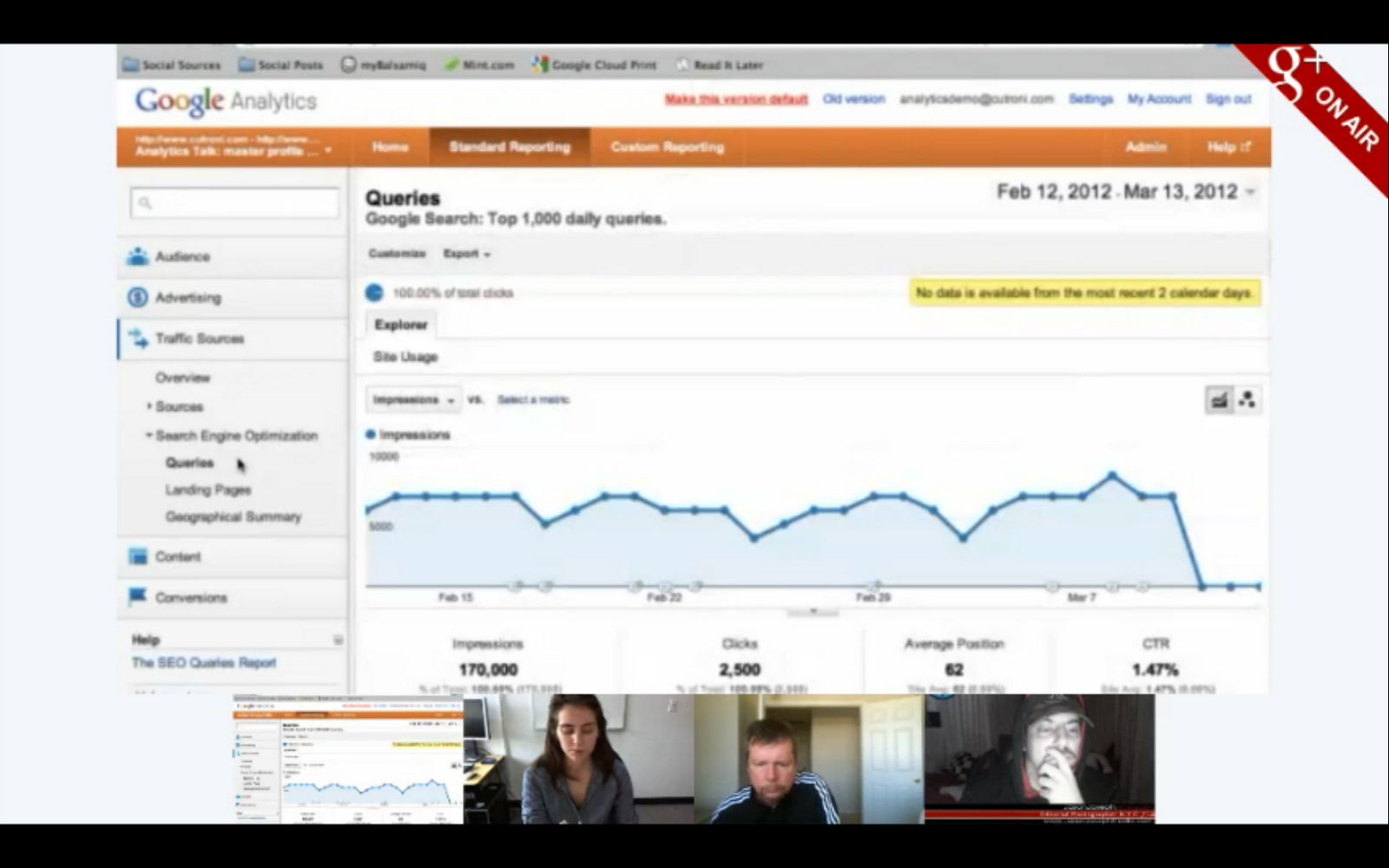
Justin shows us a feature that tells you how often you show up in Google’s organic search results and the number of click-throughs that you get.

To learn more about how to get started with Google Analytics, visit our Help Center. And remember to tune in to the live stream of our next Hangout at 11 a.m. PDT Wednesday, as we discuss how to use Hangouts (something a bunch of you guys have asked us to talk about!). We’ll be collecting your Hangout questions today on the Google+ Your Business page.

Posted by Vanessa Schneider, Google Places community manager